Macaora Keynote Template: Crafting Presentations That Captivate
You know that sinking feeling when you open a blank slide deck and realize you need to build a presentation that actually looks good? Not just functional, but genuinely polished and professional. Most of us aren't graphic designers, yet we're constantly asked to create visual content that represents our ideas, our businesses, our brands. That's where a thoughtfully designed template like Macaora changes everything.
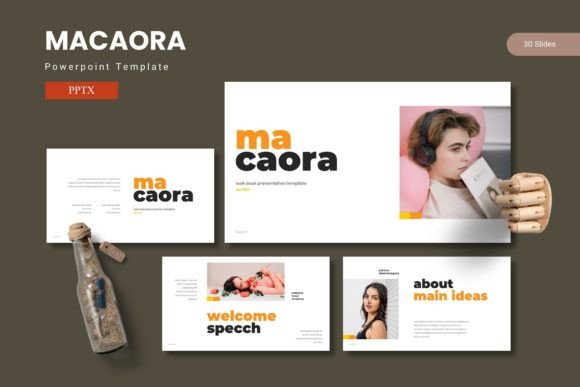
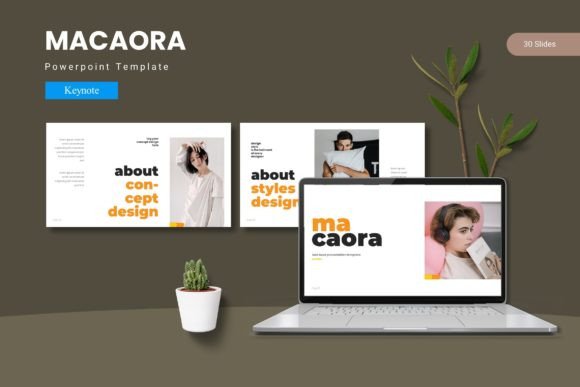
With over 150 slides spread across five premade color schemes, this Keynote template gives you a foundation that feels both comprehensive and flexible. Each color variation contains 30 carefully crafted slides, which means you're not recycling the same three layouts over and over. Your audience won't see the same tired bullet-point format repeated fifteen times. Instead, they'll encounter variety that keeps attention anchored to your message.
Why Visual Cohesion Matters More Than You Think
Think about the last presentation that genuinely impressed you. Chances are, it wasn't the content alone that caught your attention. It was the way everything fit together. The colors complemented each other. The typography felt intentional. The graphics didn't look like they were ripped from a 2008 clip art library. That sense of visual unity communicates competence before you even open your mouth.
Macaora achieves this through master slides that ensure every element aligns properly. When you swap out a color scheme or adjust a layout, the rest of the deck adapts accordingly. This isn't just about aesthetics. It's about trust. When your slides look cohesive, your audience subconsciously believes your ideas are equally well-organized.
For small business owners pitching investors, content creators presenting brand partnerships, or marketers walking clients through campaign strategies, that visual trust translates directly into credibility. You're not spending mental energy wondering if slide 12 looks weird compared to slide 3. Everything speaks the same visual language.
Infographics That Actually Communicate
One standout feature worth highlighting is the handcrafted infographic collection. Too many templates include charts and data visualizations that look generic or, worse, confusing. The infographics here feel purposeful. They're designed to make complex information digestible without oversimplifying it.
Imagine you're a freelance consultant explaining quarterly results to a client. Instead of pasting numbers into a basic table, you drag your data into a pre-built visualization that immediately clarifies trends and comparisons. The pixel-perfect illustrations are fully resizable, so whether you're projecting on a conference room screen or sharing a PDF over email, the quality holds up.
Graphic designers working on client presentations will appreciate that every element is editable. Nothing is locked down or flattened into unworkable images. You can adjust proportions, recolor individual components, and truly make each slide reflect the specific brand you're working with. This level of customization matters when you're building something that needs to feel bespoke rather than templated.
Practical Applications Beyond the Boardroom
While Keynote templates often get pigeonholed as "business presentation tools," the reality is much broader. Consider how Macaora's structure could serve different creative professionals and their needs.
Brand identity presentations benefit enormously from the gallery and portfolio slides. Designers presenting logo concepts, color palettes, or brand guidelines can showcase their work within a framework that enhances rather than competes with the designs themselves. The clean layouts act like a gallery wall, letting the work breathe.
Packaging designers can use the template to present mockups in context. Instead of sending a flat JPEG of a label design, you build a narrative around it. Show the product on a shelf. Explain the color rationale. Walk through the design decisions. The section break slides create natural pauses that help structure your story.
Social media managers and content creators might use individual slides as the basis for branded graphics. Export a beautifully designed quote slide or statistic callout, and you've got Instagram or LinkedIn content that maintains visual consistency with your broader brand identity. The five color variations give you enough range to create content that feels fresh without straying from your established palette.
Event planners and invitation designers could leverage the template's aesthetic for digital invitations or event presentations. The modern typography and refined illustration style lend themselves well to upscale events, product launches, or workshop materials.
Bloggers and digital product creators often need to create media kits, lead magnets, or course materials. Having a library of 150 plus slides means you can assemble professional-looking documents quickly without starting from scratch every time. The picture placeholder feature is particularly useful here. Drag and drop your images into designated areas, and the layout automatically adjusts to accommodate them.
Matching Design to Your Communication Goals
Choosing the right template isn't just about picking something that looks pretty. It's about finding a design system that supports how you actually communicate. A few practical considerations can help you decide whether Macaora fits your workflow.
First, think about your audience. If you're presenting to corporate clients or academic audiences, the clean sans serif typography and structured layouts convey professionalism without feeling sterile. If your work skews more creative or lifestyle-oriented, the illustration elements and color variations offer enough personality to feel approachable.
Second, consider how often you present. Entrepreneurs who pitch regularly need templates that can be adapted quickly without losing quality. The master slide system here means you can update content across multiple slides simultaneously. Change a font once, and it cascades through the entire deck. Swap a color scheme, and every element responds. This saves hours when you're customizing presentations for different clients or audiences.
Third, evaluate the file structure. The template comes with a readme file containing font and photo information, which is surprisingly important. Knowing exactly which typefaces are used and where to source them prevents that frustrating moment when you open the file and half the text renders incorrectly. Having five distinct color schemes organized into separate files also keeps your workflow clean. You pick the variation that suits your project, open it, and start working.
Building Brand Recognition Through Consistent Presentations
Every touchpoint your audience encounters shapes their perception of your brand. Presentations are no exception. When your slide decks consistently use the same color palette, typography style, and visual language as your website, social media, and printed materials, you reinforce recognition. People start associating that visual style with your expertise.
This is where having a robust template library pays dividends. Rather than cobbling together slides from different sources, you work within a unified system. The typography choices complement each other. The color schemes are calibrated to work harmoniously. Even the spacing and alignment follow a consistent rhythm that feels intentional.
For marketing professionals managing multiple brands or agencies juggling various clients, this consistency becomes even more critical. You need design assets that can be adapted across different brand identities while maintaining structural integrity. The editable nature of Macaora's graphics and layouts supports this kind of flexible yet consistent workflow.
Getting the Most From Your Template Investment
A few practical tips can help you maximize what this template offers. Start by reviewing all 30 slides in your chosen color variation before building anything. Understanding the full range of layouts available prevents you from defaulting to the same three or four slides repeatedly. There are section break slides designed specifically for transitions between topics. Use them. They give your audience mental breathing room and signal shifts in your narrative.
Experiment with the picture placeholders rather than ignoring them. These drag and drop areas are sized and positioned to maintain visual balance. When you place images within them, the surrounding text and graphics stay properly aligned. Fighting against the template's structure usually produces worse results than working with it.
Don't overlook the portfolio and gallery slides either. Even if you're not a designer showcasing visual work, these layouts work beautifully for displaying testimonials, case studies, product features, or team photos. The grid structures create visual interest without overwhelming the viewer.
Finally, pay attention to the font information in the included readme file. Using the intended typefaces ensures your slides match the preview images you saw before purchasing. If you want to substitute fonts for brand consistency, choose alternatives with similar x-heights and proportions. A mismatched font can throw off the entire visual balance of an otherwise polished slide.
Whether you're building a pitch deck for your startup, designing workshop materials for your online course, or creating branded presentations for your design clients, having a reliable template system removes friction from the creative process. Macaora gives you enough variety to stay fresh and enough structure to stay consistent. That combination is exactly what busy professionals need when they want their presentations to look like they hired a designer without actually hiring one.