Streamline Your Fasting App Design with This UI Kit
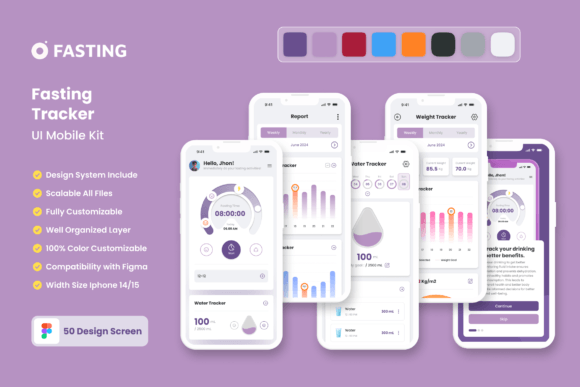
You have a brilliant concept for a fasting tracker application—perhaps one that helps users manage intermittent fasting, track their eating windows, or visualize their health progress. However, translating that idea into a functional, visually appealing mobile interface can be a daunting task. Starting from a blank canvas often leads to decision fatigue and inconsistent design choices. This is where a specialized design asset becomes invaluable. The Fasting Tracker App Mobile UI KIT offers a solution, providing a comprehensive collection of 20 pixel-perfect screen designs and over 80 UI elements specifically crafted for health and wellness applications.
More Than Just Screens: A Foundation for Visual Consistency
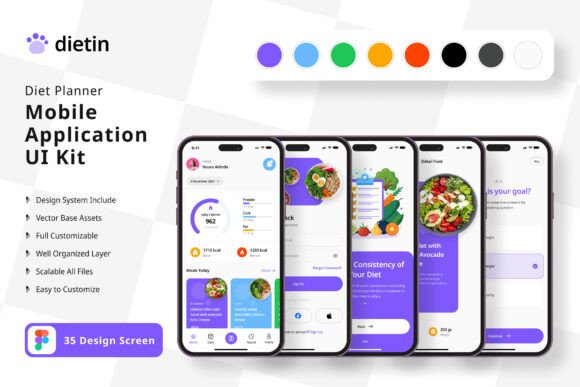
Think of this UI kit not as a rigid template, but as a robust design system. Each of the 20 high-quality templates represents a potential screen in your application—from onboarding flows and progress dashboards to meal logging and community forums. The true power lies in its components: the 80++ UI elements. These are the building blocks like buttons, icons, charts, input fields, and cards. By using these consistently throughout your project, you establish immediate visual harmony. This consistency is critical for user experience, making your app feel intuitive and professional from the first tap. It directly supports brand recognition, as users will associate a specific, polished aesthetic with your application.
For a small business owner or entrepreneur, this translates to saved time and reduced costs. Instead of commissioning a designer to create every icon and button from scratch, you have a ready-made, editable library. The kit is fully editable in popular tools like Adobe Photoshop, Adobe InDesign, and Sketch, with layers organized logically for easy customization. Need to adjust the color scheme to match your brand palette? The 100% vector layers and easy-to-change color styles make this a straightforward process. You can add or subtract elements, rearrange layouts, and truly make the design your own without being locked into a one-size-fits-all solution.
Practical Applications Beyond the App Store
While the primary use case is building a mobile application, the assets within this kit have versatile applications across your broader marketing and branding ecosystem. The clean, modern typography and minimalist icons are perfect for creating cohesive brand identity materials. Imagine using the same icon set from your app on your website, in your social media graphics, and on printed instructional guides. This creates a seamless visual language that strengthens your brand's presence everywhere.
Content creators and marketers can leverage these design assets for numerous projects. The UI elements are ideal for crafting engaging social media posts, stories, or infographics that explain fasting concepts. The screen designs themselves can be adapted into mockups for presentations, investor pitches, or promotional materials to showcase your app's functionality before it even launches. For bloggers and educators in the wellness space, the kit provides a professional toolkit for designing digital products like downloadable planners, e-book layouts, or online course interfaces, ensuring a high-quality presentation that builds trust with your audience.
Designing for Your Audience: Readability and Engagement
A fasting tracker app must communicate clearly and motivate its users. The design choices in this UI kit prioritize readability and user engagement. The included free fonts are selected for clarity on mobile screens, ensuring that critical information like fasting timers, nutritional data, and progress charts are easy to read at a glance. The symbol objects and scalable vectors guarantee that your interface looks sharp on any device, from the smallest smartphone to a larger tablet.
When customizing, consider your target user. Are they tech-savvy millennials who prefer a sleek, dark mode interface? Or a broader demographic that might appreciate a warmer, more approachable color scheme with rounded corners? The template's structure allows you to experiment with these stylistic choices. You can test different font pairings within the provided styles—perhaps a clean sans-serif for body text paired with a more distinctive display font for headings—to find the right balance between personality and professionalism. The goal is to create an interface that not only functions flawlessly but also feels supportive and encouraging, which is key to user retention in a health-focused app.
Getting Started: From Kit to Customized Product
Approaching this UI kit is straightforward. Begin by reviewing all 20 screens to map out the core user journey of your app. Identify which screens are essential for your minimum viable product (MVP) and which can be developed later. Next, dive into the component library. Familiarize yourself with the 80+ elements; having them organized in your design file will drastically speed up the assembly of new screens or variations.
A practical piece of advice: before diving deep into customization, establish your brand's color palette and select one or two primary fonts. Apply these consistently across the templates. This simple step will immediately transform the generic kit into something that feels uniquely yours. Use the scalable vectors to resize icons or buttons to fit your layout's specific needs without any loss of quality. Remember, the note that images are for preview only means you will need to source your own photography or illustrations for lifestyle shots, but all functional UI elements are included and ready to be edited.
Ultimately, this resource is about removing the technical barriers to entry. It provides the professional-grade design foundation so you can focus your energy on what truly matters: refining your app's unique features, content, and user support. By starting with a well-structured and visually coherent UI kit, you set the stage for a more efficient development process and a more polished final product that stands out in the competitive app marketplace.